01 / 07
Business Hub: a new front door for your business in ChatGPT
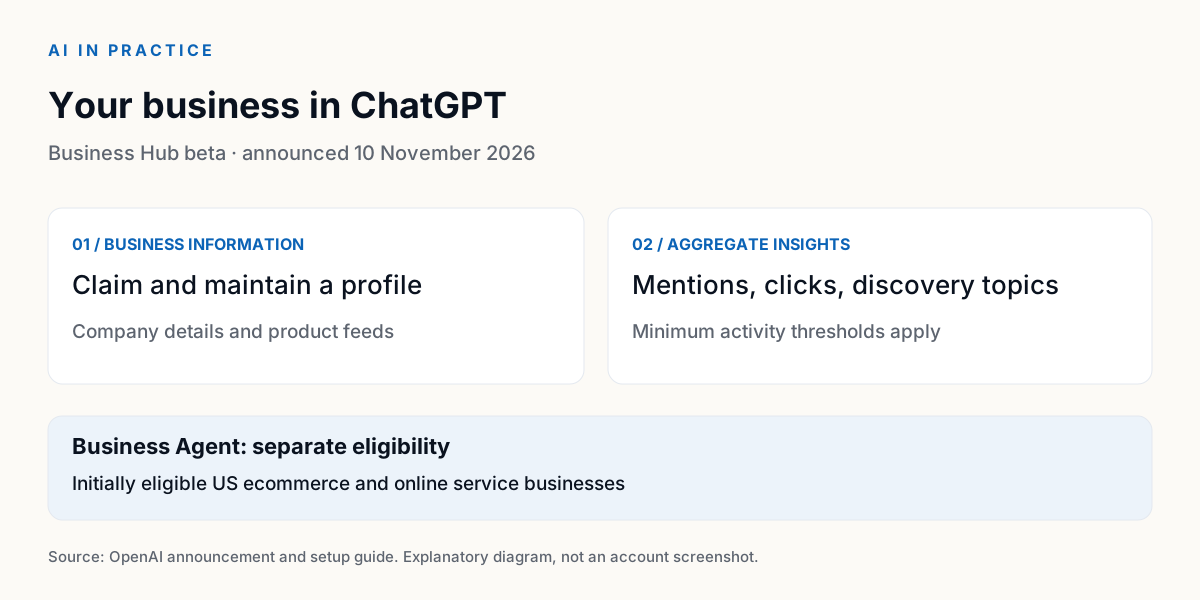
OpenAI introduced Businesses in ChatGPT in beta on 10 November. Business Hub lets eligible companies claim a profile, maintain business information and provide product feeds. It also offers aggregate insights such as mentions, website clicks and discovery topics, subject to activity thresholds.
Claiming a business does not guarantee a recommendation. Business Agents are a separate feature, initially for eligible US ecommerce and online service businesses. A profile, an agent and advertising have different requirements. That distinction matters before you plan what to show.
Practical usageFor business brain builders · 1 prompt to copy · 3 steps · not tested yet
How this affects business brain builders
Use your business brain to prepare consistent public facts: what you offer, who it is for, your website and current policies. Check them before submitting.
Checked 11 Nov 2026: availability depends on business location, type and supported verification. Claim and Persona approval are required for management features. This account’s eligibility and metrics have not been checked.
Not tested yetUsing only the public business information I provide, prepare a short company description, our main offers, intended customers, website and relevant policies. Separate confirmed facts from missing information. Identify contradictions. Do not invent prices or claims. Return a concise draft for me to review before entering it in Business Hub.
- Open the Hub in your own account and inspect the business search and options available to you.
- Compare the information shown with your current public website. Identify one correction worth making.
- If insights are available, examine a metric and its definition. A blank metric can reflect a threshold, rather than zero activity.
Can I see customers’ conversations?
No. Insights are aggregate and subject to minimum activity thresholds.
When does a new profile become public?
The setup guide says an approved new business profile publishes automatically after the required verification. Inspect the flow first; submitting a claim is a separate decision.
What others are saying1 voice from Official setup guide
The guide explains eligibility, verification, automatic publication of approved new profiles and the limits of aggregate insights. Independent practitioner results are not established in this update.
OpenAI Help Center · 11 Nov 2026 ↗